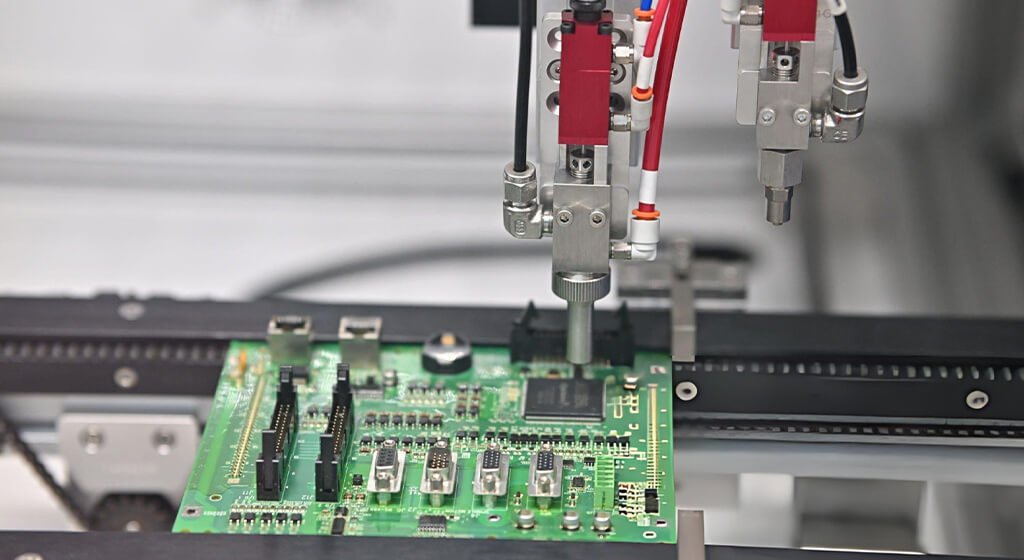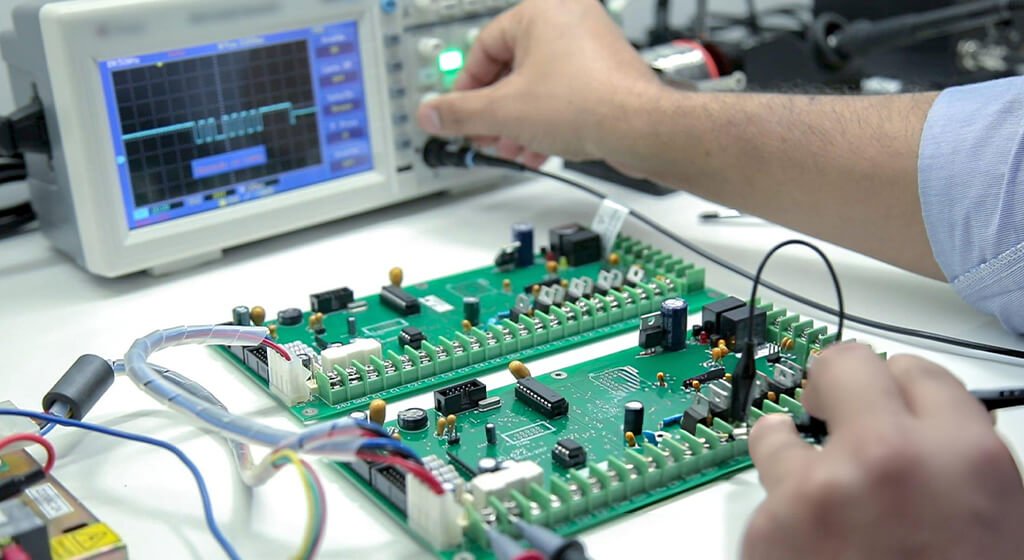
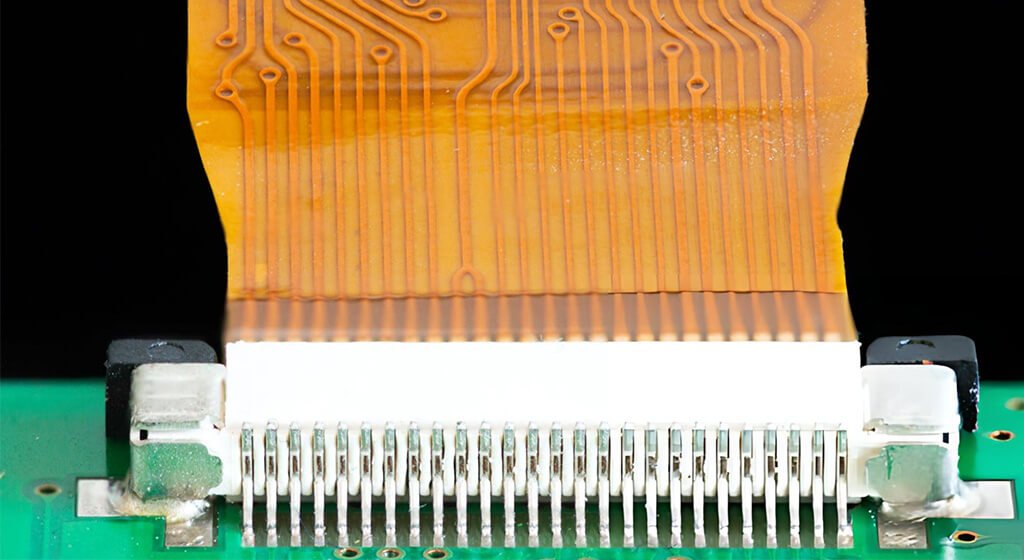
A flex PCB connector is designed to create a detachable electrical link between a flexible circuit and another assembly, which is typically a rigid printed circuit board (PCB).
When it comes to selecting the right interface, it’s essential to consider factors like contact geometry, finished tail thickness, electrical specifications, and the available operating space. While pitch and pin count are important, they’re just part of the overall picture.
Even if a connector fits the board footprint, it might still leave the flex tail poorly seated or make the actuator hard to reach.
Issues can arise from assumptions about thickness, a contact face that’s been reversed, or an enclosure that obstructs insertion. By reviewing the connector in conjunction with the flexible circuit drawing, you can identify these potential conflicts before moving into production.
This guide is here to assist you in comparing different connection methods, choosing the right connector, and verifying the mating tail against its drawing. An example regarding thickness will illustrate how to assess tolerance limits. Finally, assembly checks will ensure that the chosen interface can be installed, locked, routed, and serviced as planned.
Key Takeaways:
- The compatibility of connectors hinges on the entire mating geometry.
- The thickness of the finished insertion takes into account all permanent layers at the specified section.
- It’s important to check contact orientation and cable routing separately.
- Electrical ratings and durability are valid only under the conditions specified by the manufacturer.
- To gain production approval, you’ll need proof from representative assembled parts.
Table of Contents
1. What Is a Flex PCB Connector?
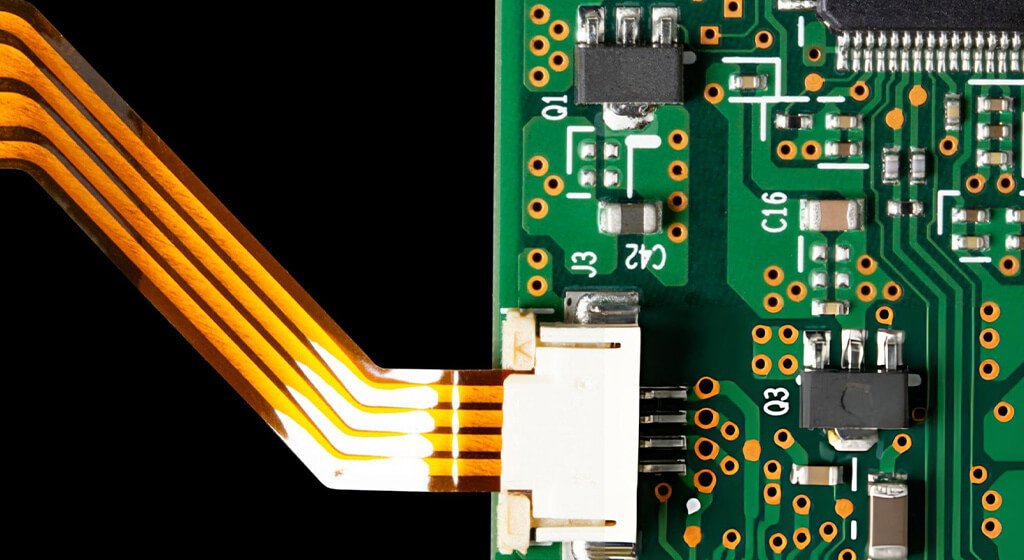
A flex PCB connector is an important electrical component that links a flexible printed circuit (FPC) to another assembly, typically a rigid printed circuit board.
In a standard tail-insertion design, the contacts within a board-mounted socket connect with the exposed pads on the flexible circuit. This setup allows you to easily disconnect the flex tail without the hassle of desoldering the socket.
The flexible part that fits into the socket is known as the mating tail. It’s crucial that its contact spacing, exposed pad design, finished thickness, and contact orientation align perfectly with the connector specifications.
Some designs even incorporate a stiffener behind the tail to ensure it has the necessary thickness and support for insertion.
1.1. FPC vs. FFC: What Is the Difference?
A flexible printed circuit (FPC) features intricate conductive traces laid out on a bendable insulating substrate.
On the other hand, a flexible flat cable (FFC) usually consists of flat conductors arranged in parallel, sandwiched between layers of insulating films.
The key distinction lies in how the conductors are arranged. An FPC allows for tailored routing, branching, and connections to components, while a standard FFC offers a straightforward parallel conductor setup between its termination points.
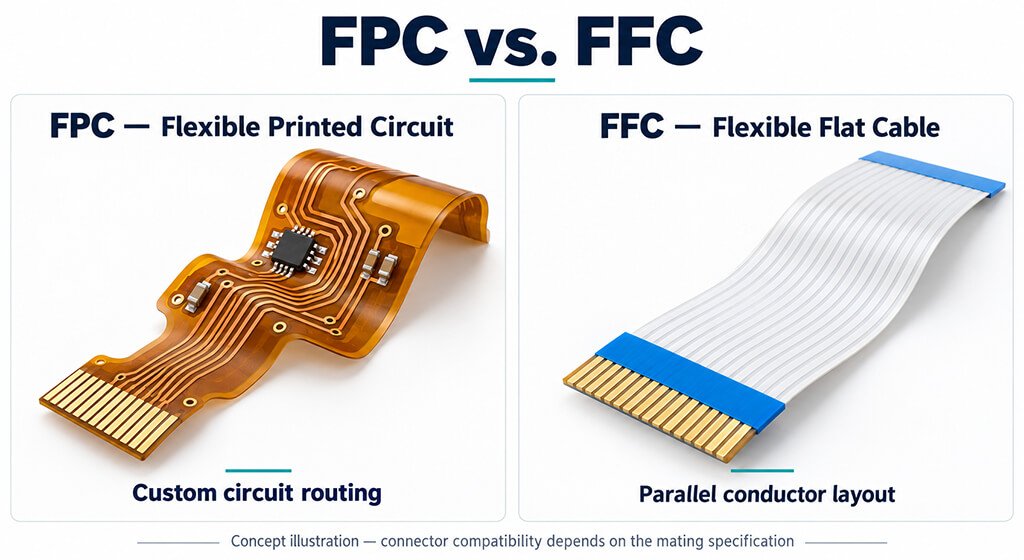
Comparison | FPC | FFC |
Conductor Layout | Custom patterned traces | Typically straight, parallel conductors |
Circuit Geometry | Can include branches and shaped outlines | Typically a flat ribbon |
Component Integration | Can include component mounting areas | Typically used as a cable between assemblies |
Connector Compatibility | Depends on the specified mating tail | Depends on the specified cable termination |
Some sockets are designed to work with both FPC and FFC connections. However, it’s crucial that your choice aligns with the required thickness, contact geometry, orientation, and retention features.
TE Connectivity provide products that can handle both types, but that doesn’t mean every FPC and FFC tail can be swapped out for one another.
1.2. Common Applications of Flex PCB Connectors
These connectors are widely used in displays, cameras, printers, tablets, and wearable devices.
When it comes to your specific application, that will guide your selection priorities.
For instance, a replaceable display needs service access, while a moving sensor needs cable support that limits loads at the mating interface. High-speed connections require suitable electrical performance across the connector and surrounding circuitry.
2. Common Types of Flex PCB Connections
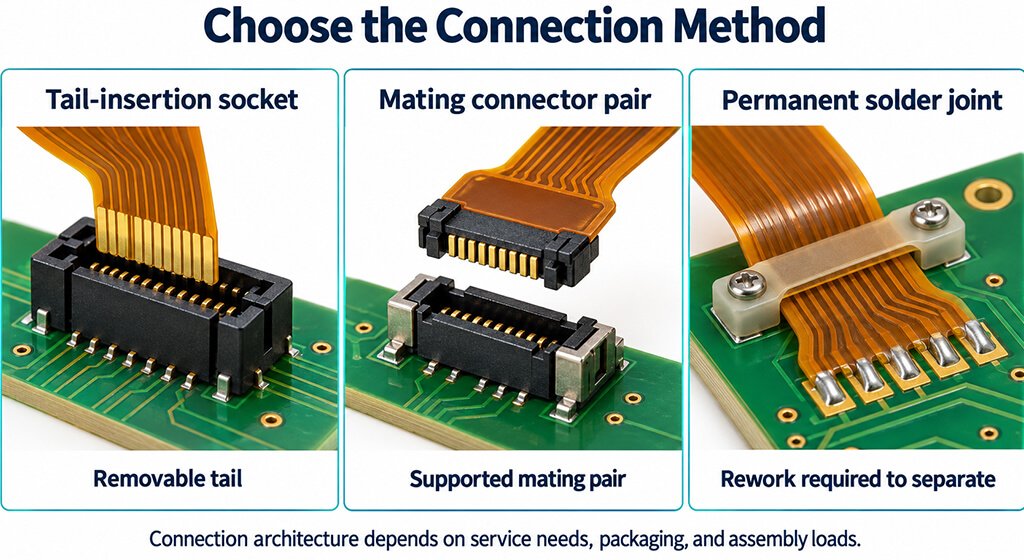
You can connect a flexible circuit through a tail-insertion socket, a mating connector pair, or a permanent solder joint.
The appropriate method depends on service access, available space, and mechanical support. When it comes to tail-insertion sockets, you’ll want to consider the insertion characteristics, which are ZIF and LIF.
Plus, don’t forget to check the actuator style, contact orientation, and mounting direction separately!
Connection method | Suitable when | Main design check |
ZIF FPC/FFC connector | The flex tail needs a removable connection with low insertion stress | Tail compatibility and actuator access |
LIF or other non-ZIF connector | The specified insertion force suits the tail and assembly process | Insertion load and retention requirements |
Board-to-board connector mounted on flex | A supported flex region can carry one half of a mating connector pair | Reinforcement, alignment, and mated height |
Direct-soldered flex connection | Routine disconnection is unnecessary | Soldering access, strain relief, and repair method |
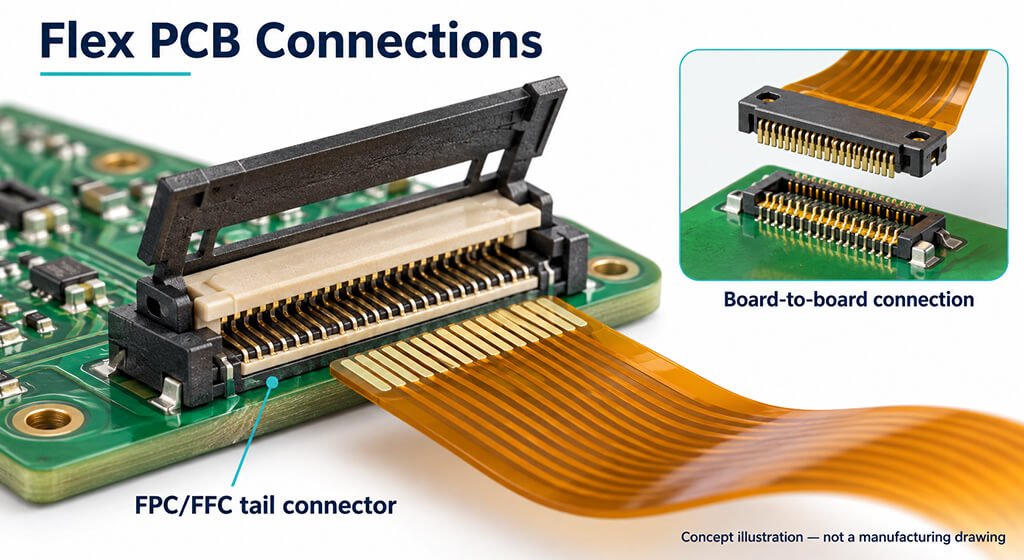
2.1. ZIF FPC/FFC Connectors
A zero insertion force (ZIF) connector allows the mating tail to enter an opened contact interface with minimal insertion resistance.
Once it’s in place, an actuator closes to create the necessary electrical connection and secure it. Depending on how it’s designed, the actuator might either rotate or slide. It’s important to ensure that your assembly process has enough space for this movement as well as for inserting the tail.
2.2. LIF and Other Non-ZIF FPC/FFC Connectors
A low insertion force (LIF) connector does need a bit of force when the flex tail connects with the mating interface. It’s important that your tail construction can handle that insertion load without buckling or harming the contact area. Enve if it’s labeled LIF, it doesn’t mean the connector is free of a movable actuator.
For instance, Molex’s 503566 application specification outlines a product that features an actuator while still offering LIF benefits.
So, when you’re comparing products, make sure to refer to the documentation for details on insertion force, locking method, and retention.
2.3. Board-to-Board Connectors Mounted on Flex Circuits
A board-to-board connection consists of two parts: a plug and a receptacle. One of these halves can be attached to a reinforced flexible area, which enables the flexible circuit to link up with the connector pair.
Your design must support the mounting area during mating and unmating. You’ll need to ensure that reinforcement, connector alignment, and installed height are all considered together to prevent assembly forces from bending the unsupported flex.
2.4. Direct-Soldered Flex Connections
A direct-soldered connection creates a lasting bond between flex conductors and board pads or other terminations. If you ever need to separate them, it involves some solder rework, which makes this method ideal for assemblies that won’t require frequent disconnection.
When designing your layout, it’s important to ensure there’s enough access for soldering and inspection, as well as support to minimize bending near the joint. Don’t forget about repair access, either: once the enclosure is put together, a compact permanent connection can be tricky to rework.
3. How to Choose a Flex PCB Connector?
When choosing a flex PCB connector, it’s important to ensure it aligns with the circuit, the enclosure, the assembly process, and the expected service conditions.
It’s much easier to select before the tail construction is finalized, as this allows for adjustments in geometry and routing.
Your review should start with the interface dimensions, then move on to operating access, and finally assess electrical and mechanical performance.
Each requirement should be backed up by a drawing, specification, or test criterion to clearly define acceptance.
- Establish whether routine disconnection is required.
- Match pitch, position count, and circuit assignments.
- Confirm the mating tail construction and contact side.
- Check insertion and actuator access inside the enclosure.
- Verify electrical performance, retention, and mating-cycle requirements.
3.1. Match Contact Pitch and Position Count
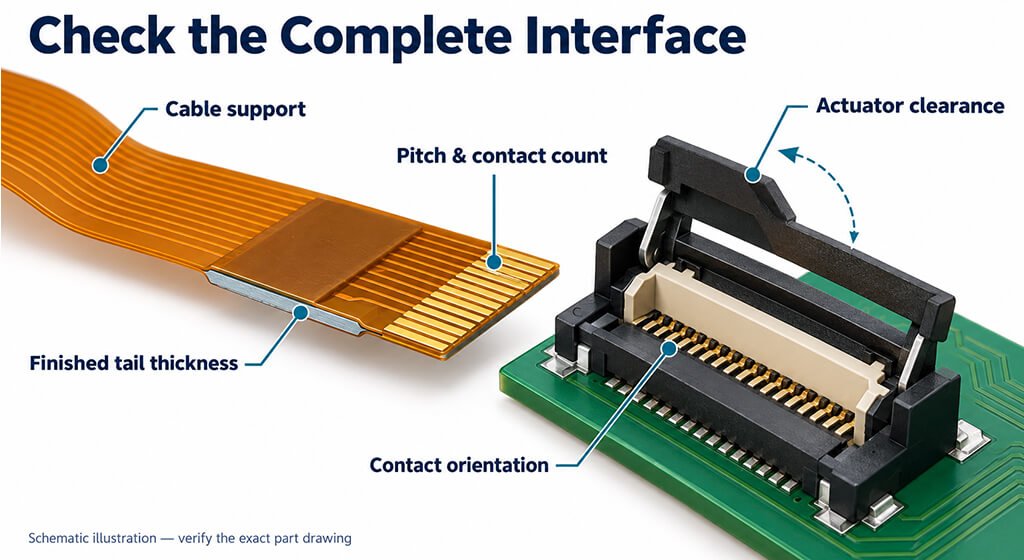
Pitch is the center-to-center distance between adjacent mating contacts. Position count tells you how many contact locations the connector provides.
Your flex tail must match both. Additionally, the contact count must be sufficient to handle all necessary signals, power connections, and grounds. While a 0.5 mm pitch FPC connector might seem to meet your initial needs, you still need to verify its tail width and retention features.
The mating pitch should come from the connector drawing. Keep in mind that some products feature staggered solder tails, which can lead to confusion when measuring across the board terminations.
3.2. Match Contact Side to the Exposed Flex Pads
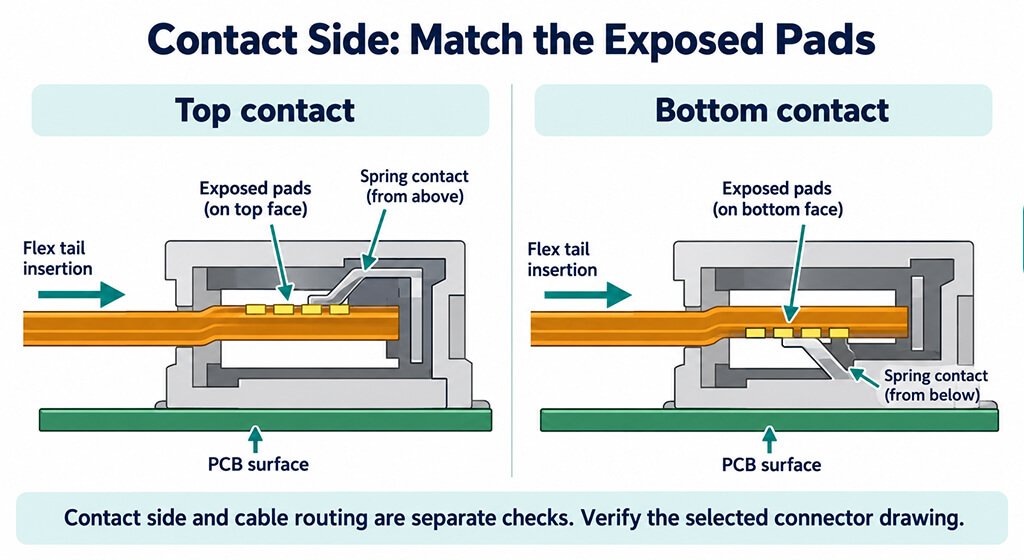
When you’re working with the connector contacts, make sure they’re aligned with the exposed pads on your flex tail.
According to TE Connectivity’s FAQ, if the pads are facing up, you’ll need top contacts, and if they’re facing down, bottom contacts are required. There are some dual-contact versions that can work with either orientation.
To make things easier, a installed assembly view can really help. It should show the board surface, exposed pads, insertion direction, and pin-one location. Just a heads up: contact orientation does not determine the cable’s final bend direction.
Don’t forget to check the thickness as well! The connector must accept the finished insertion thickness, including any stiffener and adhesive present in the mating region.
3.3. Check Connector Height and Actuator Clearance
The connector needs enough room for insertion, locking, and removal. If checking its closed height alone, it can leave you with a part that fits but cannot be operated.
Clearance check | What to confirm |
Closed height | The installed connector and tail clear the enclosure |
Actuator movement | The latch opens fully without hitting adjacent parts |
Insertion path | The tail can enter using the specified approach |
Assembly sequence | Previously installed parts leave the connection accessible |
Service access | The tail can be released without damaging nearby components |
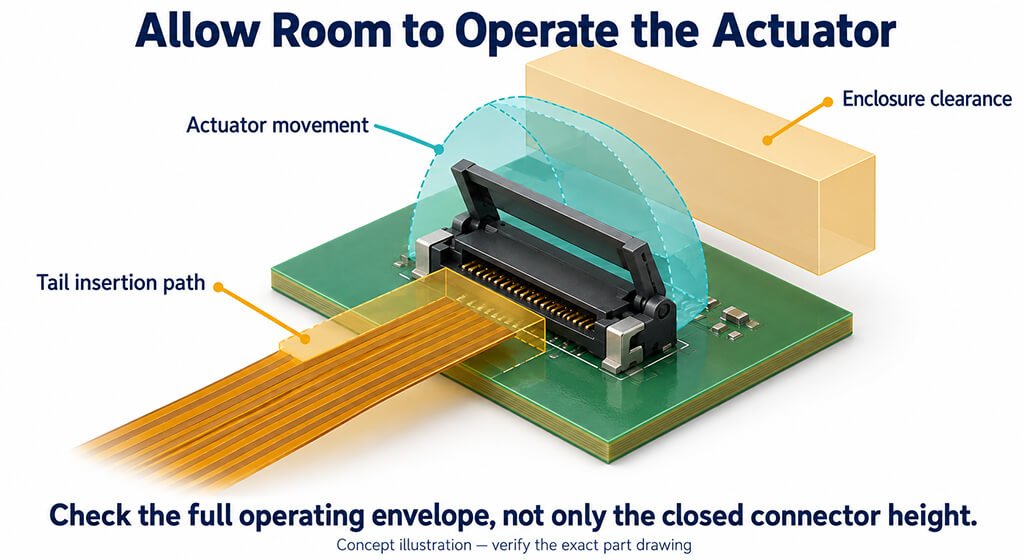
Even similar variants can have their differences. Hirose points out that the standard horizontal FH12 models stand at 2.0 mm high, while the strengthened-actuator versions measure 2.4 mm.
So, you’ll need the drawing for the specific variant when you’re working with in your layout.
3.4. Verify Electrical Ratings for the Application
When it comes to current, voltage, and temperature ratings, it’s important that they align with your specific operating conditions. Any notes or qualifications found in the data sheet are part of those ratings.
For instance, Hirose’s FH12 catalog indicates a rating of 0.5 A DC, but it also mentions that when all contacts are carrying current, you should only consider 70% of that rating. So, in that scenario, each contact would effectively handle 0.35 A.
Additionally, keep in mind that the operating temperature range takes into account the temperature rise due to current flow, as noted on page 2 of the Hirose FH12 catalog.
When it comes to high-speed signals, a different level of evaluation is necessary. Your board routing, connector, and flex together form a single channel. Even if passing a continuity test, it doesn’t guarantee that the channel will meet its signal requirements.
3.5. Verify Retention and Mating-Cycle Requirements
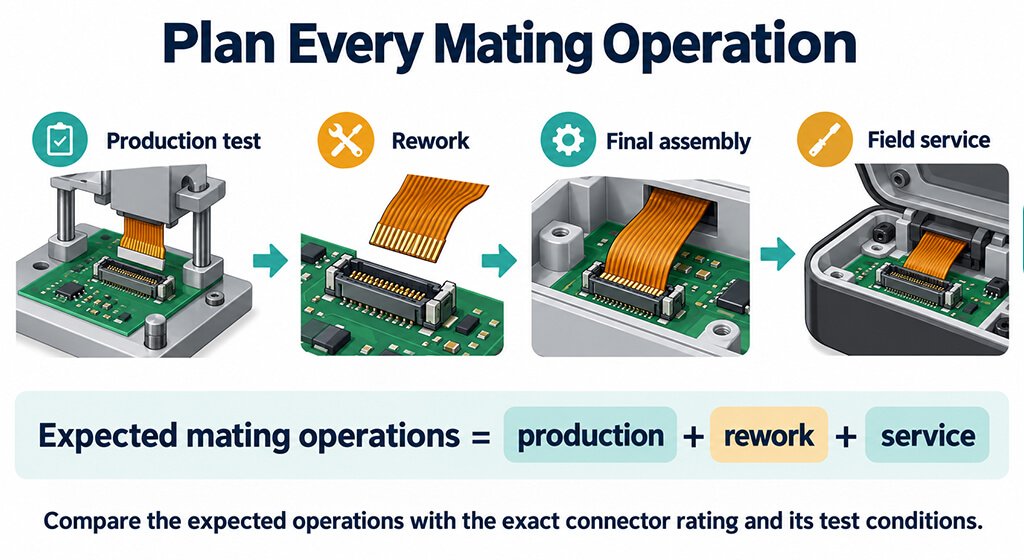
When it comes to expected mating, you should definitely factor in production testing, rework, and field service. If a connection is opened multiple times during troubleshooting, it might require a different durability rating compared to one that’s only assembled once.
According to Hirose’s FH12 catalog, there’s a specified 20-cycle insertion and withdrawal test. The acceptance criteria state that contact resistance shouldn’t exceed 50 mΩ, and there should be no damage, cracks, or displacement of components.
Keep in mind, this is a test condition for the series listed, not a lifetime guarantee for every ZIF connector.
Don’t forget about cable retention; it needs its own assessment. The locking mechanism and cable supports should be robust enough to handle the expected loads. If your assembly is going to face vibrations or repeated movements, make sure your evaluation mimics those conditions.
4. Flex Tail Design Rules for Connector Compatibility
To ensure a proper fit, your flex tail must match the connector’s specified mating dimensions throughout its manufacturing tolerance range.
This review looks at several key aspects: the finished thickness, the exposed contact geometry, the surface finish, reinforcement, and pin mapping.
Your board footprint plays a crucial role in defining how the solder attaches, while the mating-tail drawing outlines the flexible section that connects with the connector.
Both elements are essential for creating a compatible interface.
4.1. Calculate Finished Mating Thickness and Tolerance
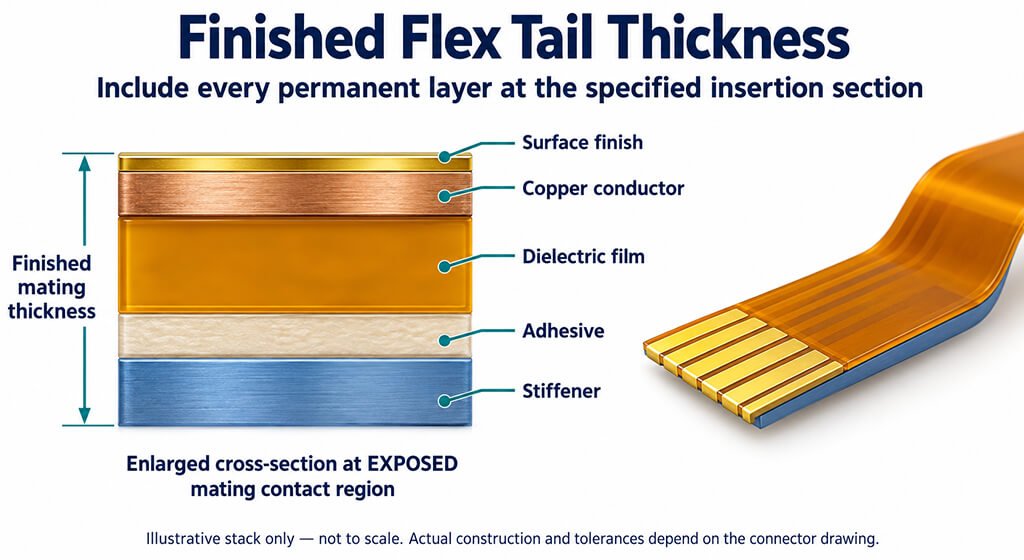
Finished mating thickness is the total permanent material thickness at the insertion section identified in the connector drawing. Depending on the construction, this may include dielectric, copper, surface finish, adhesive, and a stiffener.
When you’re calculating this, make sure to follow the actual cross-section. Remember, coverlay removed from the contact area should not be included there, while adhesive beneath a stiffener must be accounted for if it lies within the measured section.
Adhesive selection can affect the stack. DuPont lists Pyralux LF0100 sheet adhesive at 25 μm nominal thickness and LF0200 at 51 μm. These are supplied material dimensions; your finished-tail specification must account for the processed construction and its tolerances.
It’s crucial that the complete thickness range stays within the connector’s allowed limits. If just checking the nominal value, it might lead you to miss an extreme that could cause manufacturing issues.
4.2. Match Exposed Contact Geometry and Surface Finish
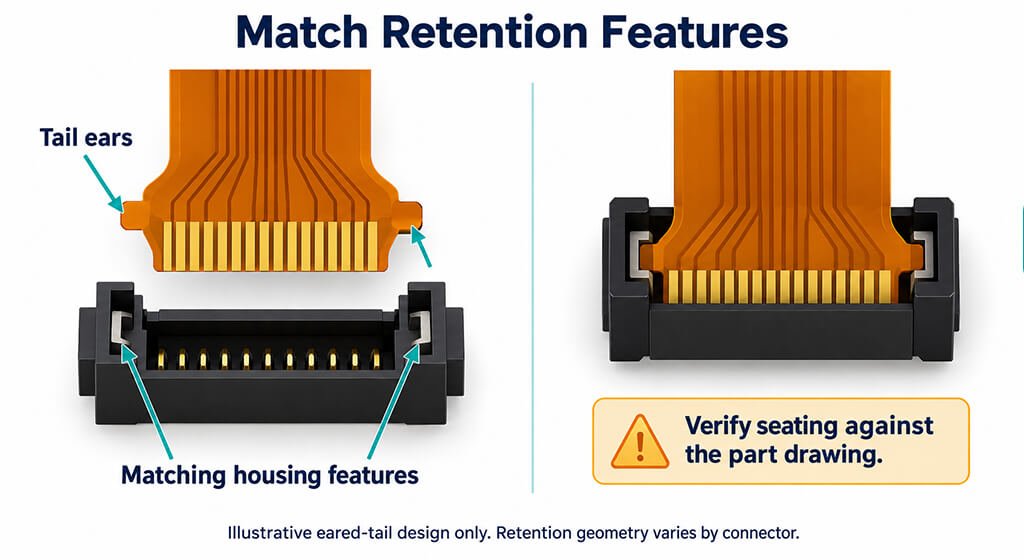
When working with exposed conductors, it’s crucial that it must match the connector drawing’s pitch, width, contact length, and position relative to the tail edge. Don’t forget to check the overall tail width and any retention ears or notches during your review.
Make sure that coverlay openings allow access to the specified contact region. Even if the conductor pattern is spaced correctly, it can still fail to connect if the exposed length or its position isn’t spot on.
Keep in mind that surface finish requirements vary by product. For instance, Molex’s 503566 application specification specifies gold-plated FPC conductors with a nickel underlayer. Your fabrication drawing should identify the finish required by the selected interface, including any specified thickness.
4.3. Design Stiffener Transitions and Strain Relief
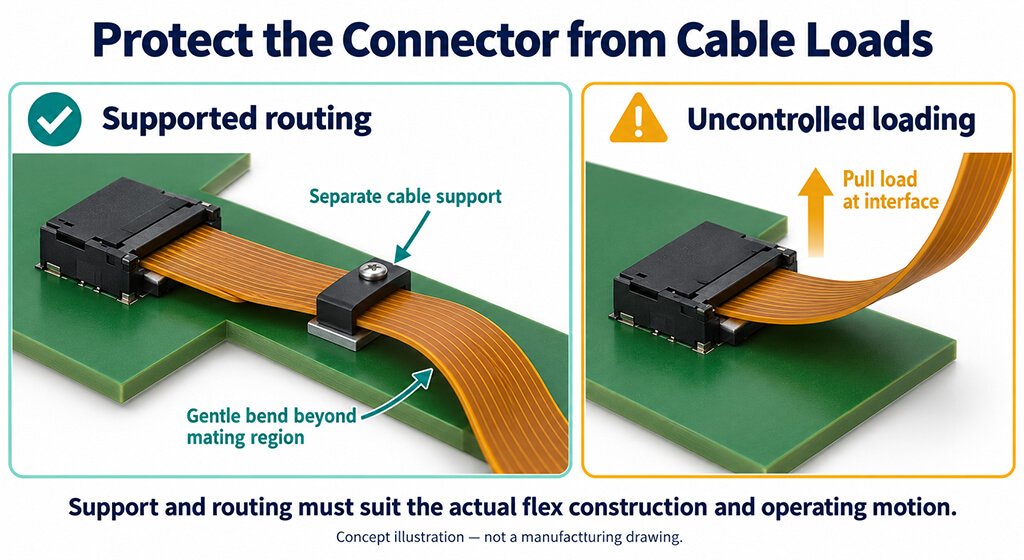
A stiffener plays a crucial role in providing local support and ensuring that you achieve the necessary mating thickness. Strain relief is essential for managing how cable movement and external forces affect the connection.
When planning your installation route, it’s important to avoid allowing bending and pull loads to concentrate at the connector entrance or the stiffener boundary. Additionally, the support setup should allow enough space for easy insertion and smooth actuator operation.
Molex’s 503566 instructions caution against applying excessive load after insertion and suggest securing the FPC if it will be under continuous loading.
For flexible and rigid-flexible printed boards, IPC-2223 outlines the necessary design framework. Your bend geometry and reinforcement details should follow the applicable edition, circuit construction, and service conditions. Remember, a single bend distance won’t work for every flex design.
4.4. Verify Pin-One Mapping in the Installed Assembly
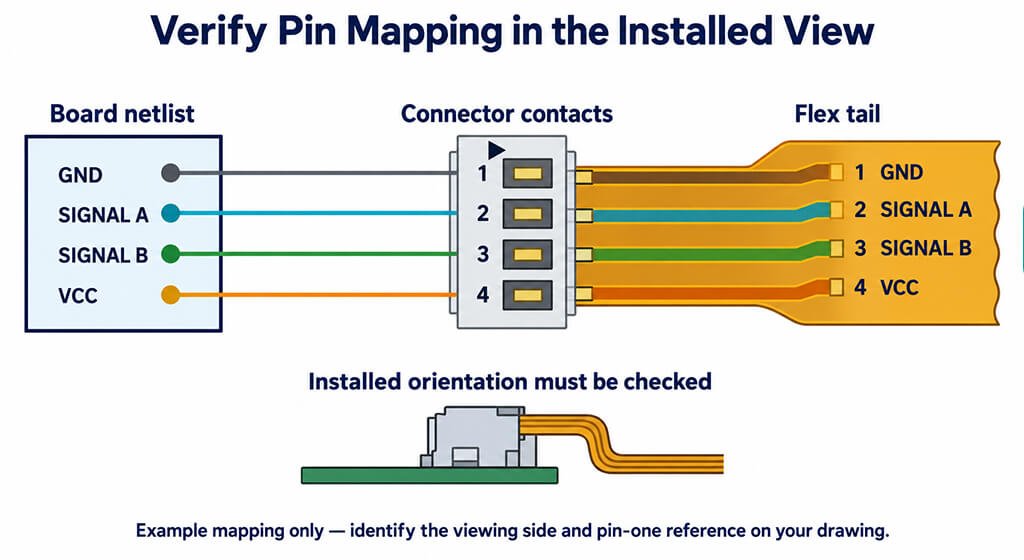
Pin-one mapping identifies how each circuit passes through the board footprint, connector contacts, and flex tail. When you review it, make sure to trace the electrical connections throughout the installed assembly, including any folds that might be present.
Keep in mind that looking at a drawing from the opposite side can reverse the apparent contact order. Clear references prevent that visual change from becoming a wiring error.
Your assembly drawing should identify the viewing side, exposed contact face, insertion direction, and pin-one location. The schematic symbol, footprint numbering, and flex net assignments should then be checked against that same view.
5. Worked Example: Checking a Flex Tail Against a Connector Drawing
A flex tail is considered to pass a thickness check only when its entire specified thickness range fits snugly within the connector’s allowed mating limits.
In this case, the connector limits are derived from a Molex drawing, while the proposed tail dimensions are just hypothetical.
This calculation is useful for pinpointing any incompatible tolerance ranges before diving into the other interface requirements.
5.1. Compare the Tail Thickness Envelope with Connector Limits
Molex’s 501951 drawing indicates that the finished mating thickness should be 0.30 ±0.05 mm, which means it can range from 0.25 mm to 0.35 mm for the mating construction shown.
For a nominal thickness with a bilateral tolerance:
- Minimum tail thickness = nominal thickness − tolerance
- Maximum tail thickness = nominal thickness + tolerance
The following proposals are teaching examples, not measured production samples.
Proposed finished tail | Calculated thickness range | Comparison with 0.25–0.35 mm limits | Thickness assessment |
Tail A: 0.30 ±0.03 mm | 0.27–0.33 mm | Entire range fits, with 0.02 mm margin at each boundary | Passes this dimensional check |
Tail B: 0.34 ±0.03 mm | 0.31–0.37 mm | Maximum thickness exceeds the upper limit by 0.02 mm | Fails this dimensional check |
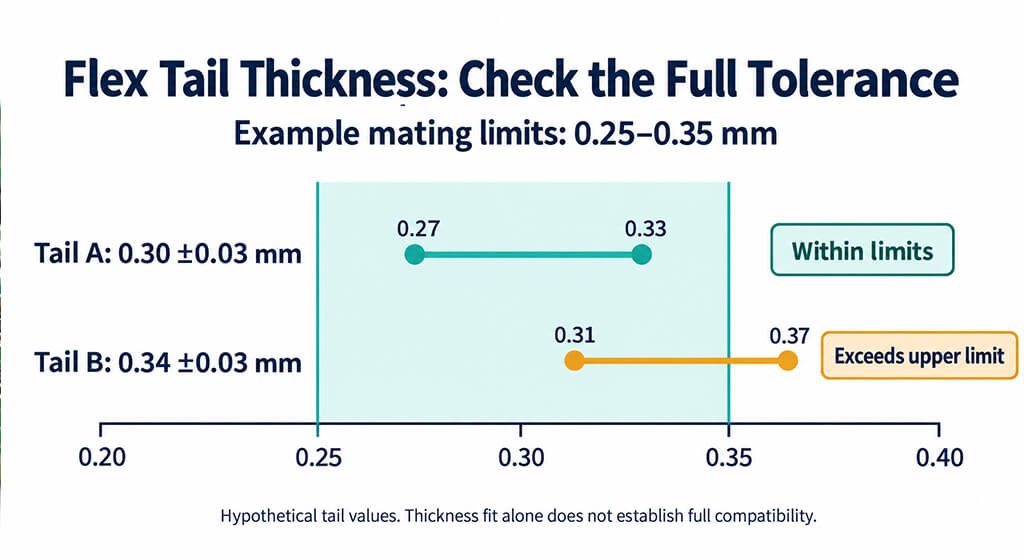
Tail B shows us that just looking at the nominal value isn’t enough. While its nominal thickness is within the acceptable range, the manufacturing variation actually goes beyond the upper limit.
You have a few choices here: you could modify the tail design, set a more controlled tolerance, or pick a connector that can handle the necessary thickness.
On the other hand, Tail A’s calculated margins tells the dimensional clearance against the stated limits. They do not predict contact force, retention, or service life.
5.2. Complete the Remaining Interface Checks
Tail A still needs to align with the connector’s contact orientation, exposed conductor geometry, tail width, and retention features.
Your electrical review must confirm pin mapping, while the installed assembly must provide access for insertion and locking.
A helpful review record categorizes each requirement into one of three outcomes:
- Confirmed: The drawing or verification shows that everything is in compliance.
- Failed: The proposed interface doesn’t meet a specified requirement.
- Unresolved: There’s still some missing information or verification.
For instance, a matching thickness range cannot resolve an unspecified exposed contact length. That item remains open until the tail drawing and connector requirement can be compared.
Once the documented interface checks pass, representative assembled parts can be evaluated for seating, locking, cable routing, and the application’s electrical and mechanical requirements.
6. Assembly Checks and Common Connector Failures
Make sure your assembly check verifies that the flex tail can be easily inserted, seated, and locked into place without causing any damage in the actual product setup.
The parts you use should accurately reflect the specified tail design, connector, and cable routing.
It’s important to conduct separate checks for electrical continuity, mechanical retention, and operator access. Even if getting a successful connection on an open bench, it doesn’t guarantee that all three aspects are covered.
6.1. Insert and Lock the Flex Tail Correctly
The selected connector’s instructions will guide you on how to insert it, move the actuator, and perform seating checks.
Here’s how to break it down into a step-by-step process for the assembler to follow:
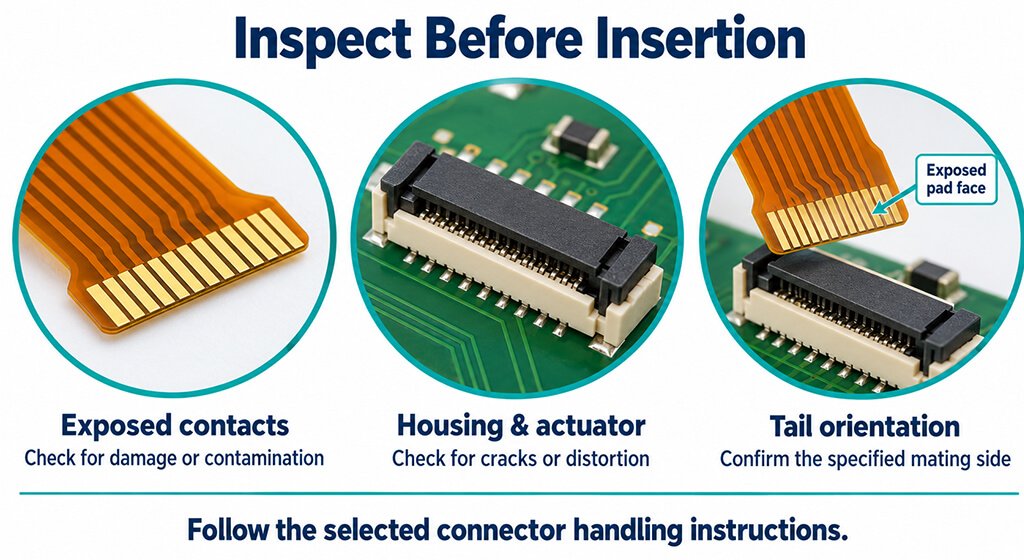
- Confirm the connector variant and inspect the housing, actuator, and flex contacts for damage.
- Open the actuator to its specified position.
- Orient the exposed pads correctly and insert the tail using the prescribed approach.
- Check seating against the manufacturer’s positioning features or inspection criteria.
- Close the actuator, then confirm that the installed route leaves the interface free from unintended loading.
Keep in mind that some connectors need an angled approach.
For instance, Molex recommends an angle of about 9° when inserting the FPC into its 503566 connector. It also warns that if inserting at too steep an angle, it could damage the connector or flex conductors.
Remember, these instructions are specific to that product and don’t apply to every FPC connector out there.
6.2. Troubleshoot Intermittent Contact and Flex Damage
A symptom identifies where to investigate; but it usually doesn’t reveal the underlying cause.
When you’re inspecting, it’s important to differentiate between a mating issue and problems related to routing, circuit mapping, or signal performance before deciding on the best corrective action.
Observed symptom | Possible causes | Useful next check |
Continuity changes when the flex moves | Incomplete seating, incorrect mating thickness, or cable loading | Inspect seating, measure the mating region, and assess the installed support |
Actuator resists closure | Incompatible tail construction, obstruction, or incorrect operation | Compare the sample and operating sequence against the product instructions |
Tail withdraws after assembly | Incomplete locking, mismatched retention features, or excessive pull load | Inspect engagement and evaluate retention under the specified conditions |
Damage appears near the stiffener edge | Concentrated bending or handling load | Examine the transition geometry and cable route |
Continuity passes but data errors remain | Incorrect circuit mapping or inadequate signal-channel performance | Verify net assignments, then evaluate the complete signal path |
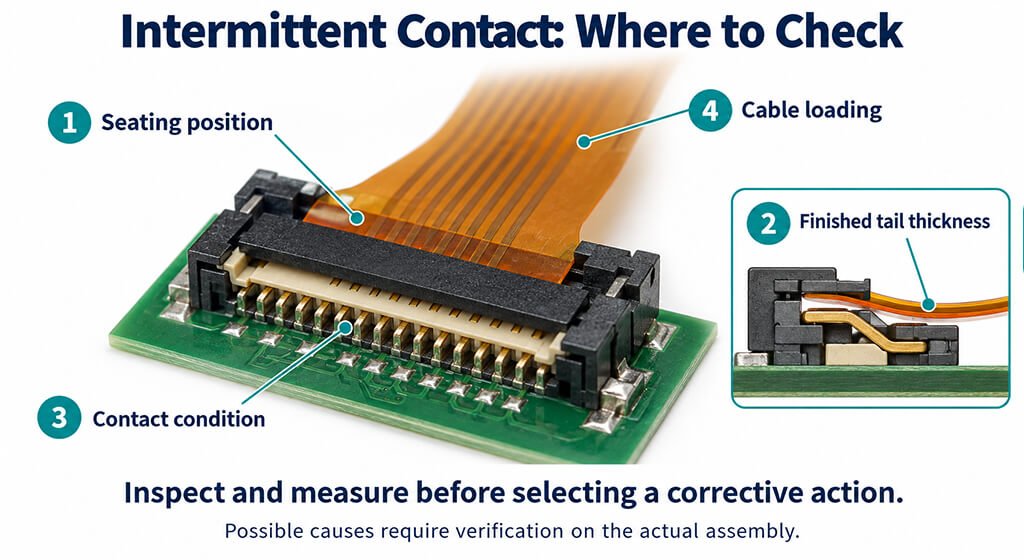
It’s important for the failure record to clearly separate suspected causes from confirmed issues.
Even if swapping out the connector gets rid of the symptom, your investigation must still determine whether the original problem involved the connector, mating tail, or assembly process.
6.3. Complete a Preproduction Connector Checklist
Make sure your release records clearly indicate which construction was assessed and the evidence that backs up its approval.
The checklist below connects each review item to a decision basis.
Review item | Verification method | Acceptance basis | Evidence to retain |
Connector identity | Compare received parts against the bill of materials (BOM) | Approved complete part number and variant | Supplier and receiving records |
Tail construction | Review drawings and measure representative finished samples | Specified mating dimensions and tolerances | Drawing revision and measurements |
Circuit mapping | Trace net assignments and perform continuity checks | Approved schematic and interface map | Electrical test results |
Assembly access | Perform insertion and locking in representative hardware | Released assembly sequence | Assembly observations and work instructions |
Retention and routing | Inspect engagement and evaluate installed loads | Connector and application requirements | Mechanical evaluation results |
Mating durability | Compare expected operations with the selected product’s rating | Production, rework, and service requirements | Cycle budget and applicable test results |
Alternative component | Review mechanical, electrical, and processing differences | Approved substitution requirements | Documented comparison and approval |
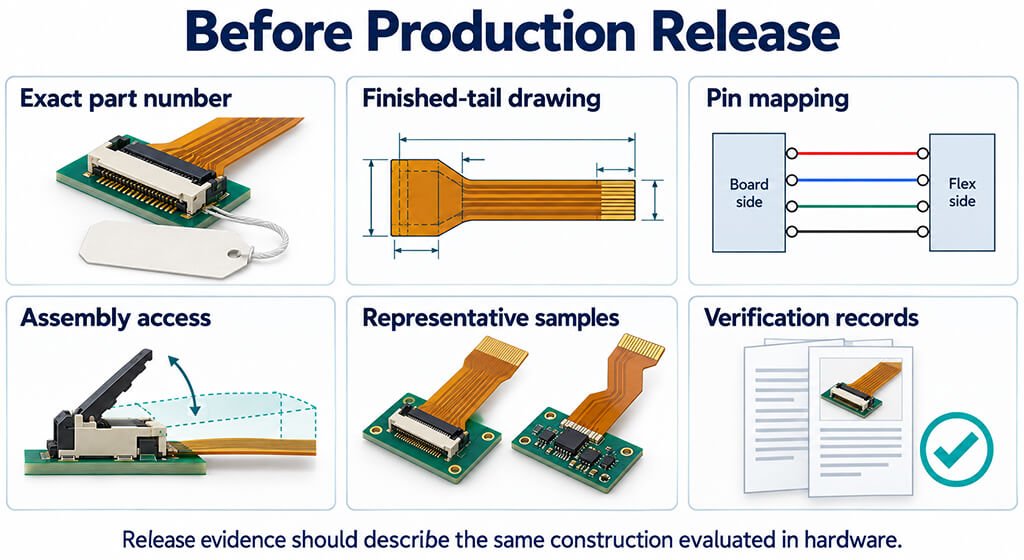
Environmental verification needs defined conditions and acceptance criteria.
A requirement such as “pass vibration testing” leaves the excitation, duration, mounting arrangement, and permitted electrical interruptions unspecified.
A different stiffener adhesive can affect the finished tail construction, while a replacement connector can change operating clearance or retention geometry. It’s important to keep a detailed change record that highlights which previous measurements and which ones will need to be redone.
7. FAQ About Flex PCB Connectors
Are FPC and FFC Connectors Interchangeable?
Certain connectors can accommodate both types, as long as the FPC or FFC aligns with the required mating thickness, contact geometry, orientation, and retention specifications.
Are ZIF Connectors Always More Durable Than LIF Connectors?
No. Durability depends on the specific connector’s mating-cycle rating, test conditions, and intended use.
Can a ZIF FPC Connector Carry High-Speed Signals?
Absolutely! The right designs can really enhance high-speed interfaces. For instance, Hirose’s FH55/FH55M ZIF series boasts PCI Express Gen.4 support, hitting speeds of 16+ Gbps. However, it’s important to remember that the fully assembled channel still needs to be verified.
Can a Connector Be Replaced by Another with the Same Pitch and Pin Count?
Those parameters alone are insufficient. The replacement must also meet your footprint, mating-tail, contact-orientation, clearance, electrical, and assembly requirements.
8. Conclusion
It is important to finde the right flex PCB connector. It needs to align perfectly with your finished flex tail and fit seamlessly into how your product is assembled and serviced.
While pitch and pin count are important factors to consider, you also need to pay attention to thickness tolerance, contact orientation, electrical ratings, and operating clearance to ensure it fits your design.
A representative hardware on hand allows you to verify these requirements before moving into production.
When you put together your review package, make sure to include the exact connector part number, the tail drawing, pin mapping, and any verification results.
It’s essential to resolve any lingering questions about fit or performance before you place an order for production quantities.
If there are any changes to the connector, reinforcement, adhesive, or cable routing, revisit the relevant dimensions and tests to confirm that the updated assembly still meets your specifications.